56I want to decide what AI does in my app
Every assisted feature, what it sends, and one switch that stops all of it
- Nothing is on to begin with. Every assisted feature is off until you switch it on yourself, one at a time.
- They all live in one place: Settings → Assisted Features.
- Some are premium (PDF Pattern Translation). Some are beta (Studio, Colour Swatcher, Magazine, Video Sharing). Each row says which.
- Works on iPhone, iPad, Android and the web.
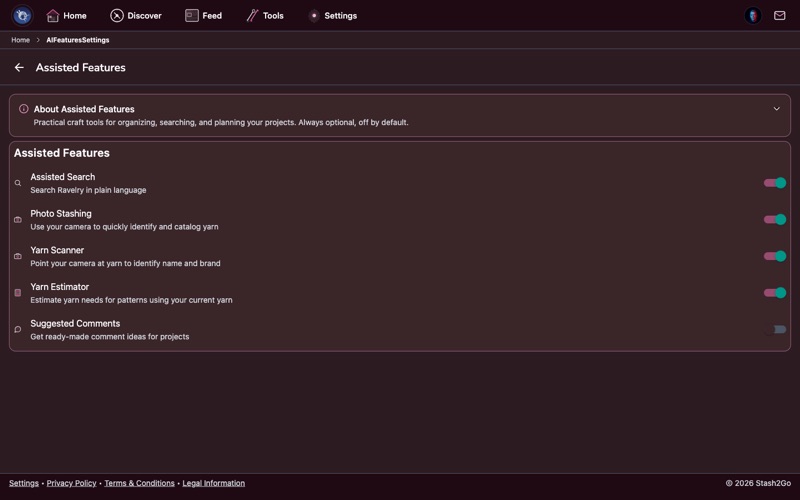
One switch sits at the top of Settings → Assisted Features: Turn AI off completely. Turn it on and every feature below it goes off and disappears. None of them can be switched on again while it is set. Nothing is offered, and nothing is sent.
It is off to start with, because every feature underneath is already off on its own. There is nothing to stop until you ask for something. Your choices are remembered too. Allow assisted features again and what you had switched on comes back, rather than starting from nothing.
Every row has a tag and a plain sentence beginning Sends:, so you can decide without reading a policy. A card at the top counts how many you have switched on. Tap it for the detail of what is sent and what limits apply.
AI means the feature sends something to an OpenAI model. OpenCV means the picture is read on your own device and nothing leaves it.
- Assisted Search
- Sends your search words, plus a one-off preference profile built from the public side of your Ravelry profile. Deletable, and your ordinary search is untouched.
- Photo Stashing & Yarn Scanner
- Send the label photo you take. The scanner keeps nothing.
- Yarn Estimator
- Sends the pattern and yarn details for the size you picked.
- Suggested Comments
- Sends the item's title, description, designer, craft, tags and yarn, plus your country.
- PDF Pattern Translation
- Sends only the passage you asked about, with its title and page. Never the file. Premium.
- PDF Auto-Setup
- Sends the pattern text, and a chart picture when you ask for one to be read. Never the file.
- Colour Swatcher
- Sends nothing about you. Your yarn, stash and photos are never sent.
- Magazine
- Sends nothing about you. The articles themselves are written with a model.
- Studio
- Sends the link to the yarn photo you asked about.
- Bobbin
- Sends your message and which screen you are on, plus up to 25 recent entries when the question needs them.
- Video captions
- Sends the project details, when you ask for captions.
Each row stands on its own. Turning on Bobbin does not turn on the Colour Swatcher. Turning on Assisted Search does not change your ordinary search. Switch one on, try it, switch it off again if it is not for you. Nothing else moves.
A few of them show up elsewhere once they are on. Assisted Search adds a card on Discover. The Magazine adds a segment in the Feed. The Colour Swatcher appears on a pattern's Yarns tab. Auto-Setup appears in the pattern reader.
It does not write patterns, and it never will. A knitting pattern is a designer's work, and a machine-written one wastes your yarn and your evenings. Assisted features help you search, read and record.
Nothing you send is used to train a model. What is sent is spelled out on every row. And if you would rather none of it existed, step 1 takes the whole lot away in one tap.
Available on iPhone, iPad, Android, and web at app.stash2go.com