30I want to export my data
Download your project data as CSV, JSON, text, or a file Excel can open
Before you start
- Tools → Utilities → Export Row Counters, which is hidden in Basic mode.
- Exporting your account data is a separate thing, under Settings → Account.
- An export is a file. On the web it downloads. On a phone it is shared.
1
Where the exports live
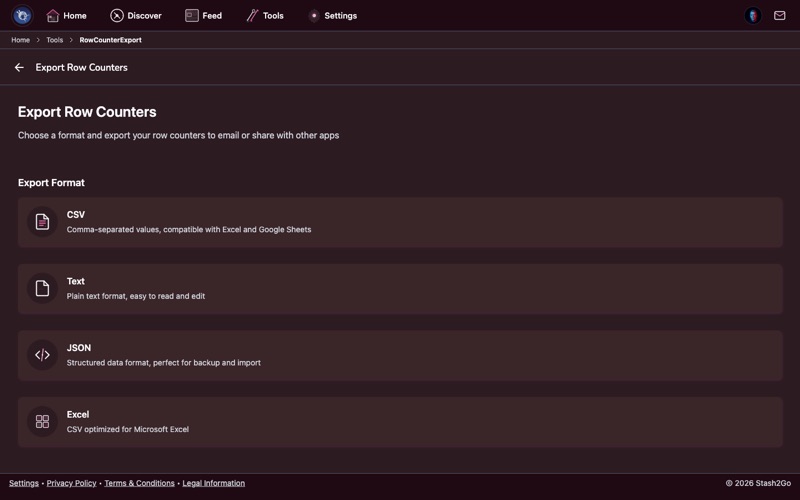
There is more than one place to export from. Tools → Export Row Counters gives you your counter data. Settings → Account gives you a wider export.
Find more tools in Tools & Calculators.
2
Get your counter history out
Go to Tools → Export Row Counters. Pick the format you want: CSV for a spreadsheet, JSON for developers, plain text, or a file made for Excel. Then download your counting history.
Tip: Export now and then if you want a record of how fast you knit and how you got on over time.
Learn about counters in Track Your Rows and Rounds.
3
Which format?
Each one is for a different job:
| CSV | Values with commas between them. Opens in Excel, Google Sheets and Numbers. |
| Text | Plain text. Easy to read, and easy to send in an email or a message. |
| JSON | Structured data. For developers, or for feeding into another tool. |
| Excel | A CSV set up for Microsoft Excel, with the right encoding and formatting. |
Tip: CSV fits almost everywhere. Google Sheets, Excel, Numbers and most other data tools will open it.
4
Save the file
The file is made and ready to download. Save it to your device or your cloud storage, or send it in an email.
Available on iPhone, iPad, Android, and web at app.stash2go.com