
Row Counter for Knitting & Crochet
Track rows, rounds, and repeats without losing your place
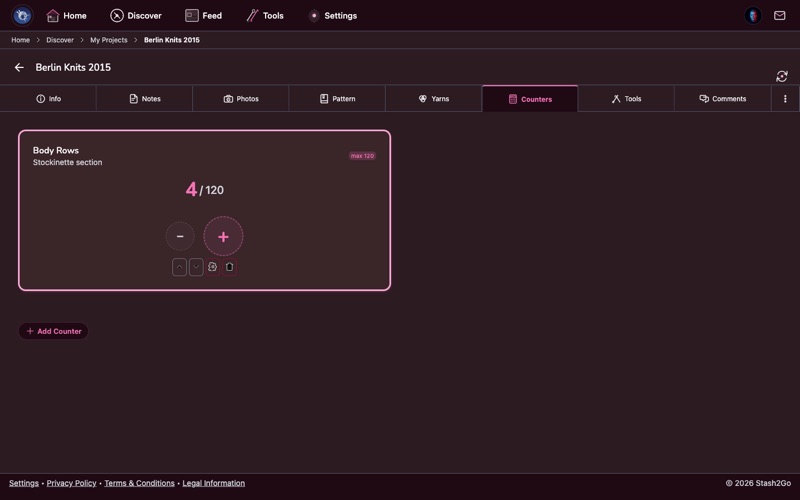
Keeping track of where you are in a pattern is one of the biggest challenges in knitting and crochet. Stash2Go gives every project its own set of digital row counters that sync across all your devices - so you never lose your place, even across multi-day sessions. Set up multiple counters, chain them together, color-code them, and let auto-reset handle your repeats. See the step-by-step guide
What You Can Do
Multiple Counters
Create as many counters as your pattern needs - body rows, repeats, shaping intervals, and sleeves all on one screen.
Counter Chaining
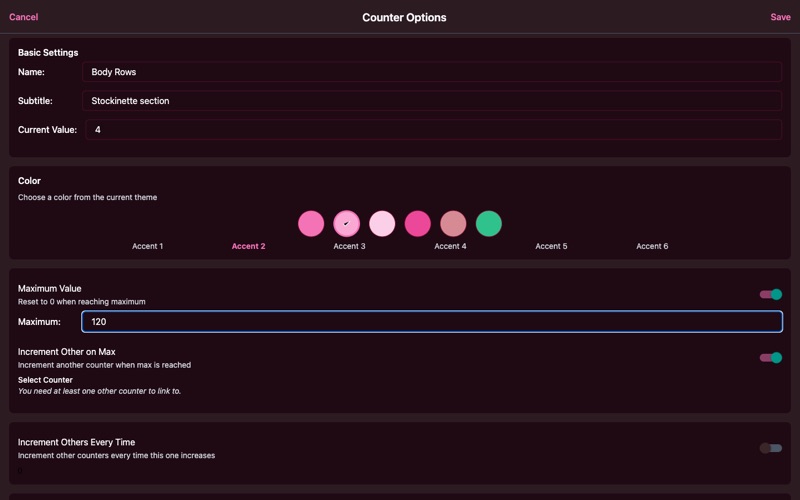
Link counters so one tap cascades across your setup. A repeat counter auto-advances when a row counter resets.
Color Coding
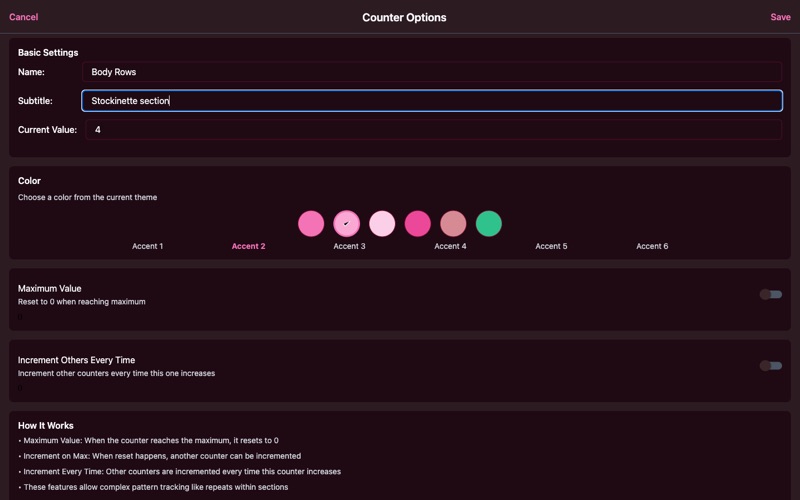
Assign colors to tell counters apart at a glance. Ten theme-matched colors adapt to light mode, dark mode, and all 40 themes.
Max Values & Auto-Reset
Set a maximum and the counter resets automatically. A progress indicator shows where you are in the current repeat.
Apple Watch
Count rows from your wrist without picking up your phone. Increments and decrements sync back to all your devices instantly.
Cross-Device Sync
Start counting on your phone, continue on your tablet or web browser. All changes sync automatically via the cloud.
PDF Viewer Integration
View your pattern PDF and row counters side by side. No more switching between apps to check which row comes next.
Export Data
Export all counter data as TXT, CSV, JSON, or Excel. Keep records of your work or share counter setups with friends.
Real-World Examples
Counter chaining and auto-reset solve real knitting problems. Here are some common setups:
Lace Repeats: Set a "Row in Repeat" counter with maximum 12 and chain it to a "Repeat Count" counter. One tap per row - the repeat counter ticks up automatically every 12 rows, and the progress indicator shows exactly where you are in the current repeat.
Top-Down Raglan: A master "Yoke Rows" counter chains to "Increase Row" (max 2, auto-reset) and "Total Increases" via increment-on-max. One tap per row drives the entire setup - you always know whether this row is an increase row and how many increase rounds you've completed.
Stripe Sequence: A "Rows in Stripe" counter (max 4) chains to a "Stripe Count" counter. When it resets, switch colors. Odd stripes = Color A, even = Color B.
Frequently Asked Questions
Is the row counter free?
Yes. Row counters are included free in Stash2Go on iPhone, iPad, Android, and the web. There is no limit on the number of counters you can create.
Can I use multiple counters at the same time?
Yes. Each project can have as many counters as you need. Use separate counters for body rows, repeats, shaping intervals, sleeves, and more - all visible on one screen.
What is counter chaining?
Counter chaining lets one counter automatically advance another. For example, a "Row in Repeat" counter with a maximum of 8 can auto-increment a "Repeat Count" counter every time it resets. One tap per row drives your entire counting setup.
Do my counters sync across devices?
Yes. Counters sync automatically across all your devices via the cloud. Start counting on your phone and continue on your tablet, Apple Watch, or the web app at app.stash2go.com.
Can I use the row counter on Apple Watch?
Yes. The Apple Watch companion app lets you increment and decrement counters from your wrist - perfect for counting rows without picking up your phone.
How does auto-reset work?
Set a maximum value on any counter and it will automatically reset to zero when reached. A progress indicator shows how far through the current cycle you are. Perfect for repeating stitch patterns, stripe sequences, and cable twists.